Best indoor golf simulators get sold on data point counts and sticker price, and that’s exactly why so many buyers end up with a launch monitor that can’t read a shot in their actual room. Every retailer roundup on page one leads with specs. None of them opens with a tape measure.
Five units, tested against room depth, software cost, and a real five year budget instead of a checkout price: the Bushnell Launch Pro Circle B, Garmin Approach R50, SkyTrak ST MAX, Rapsodo MLM2PRO, and Garmin Approach R10. By the end you’ll know which fits a 15 foot basement, which needs 20, and what to buy instead if your room says no.
Our Top Picks at a Glance
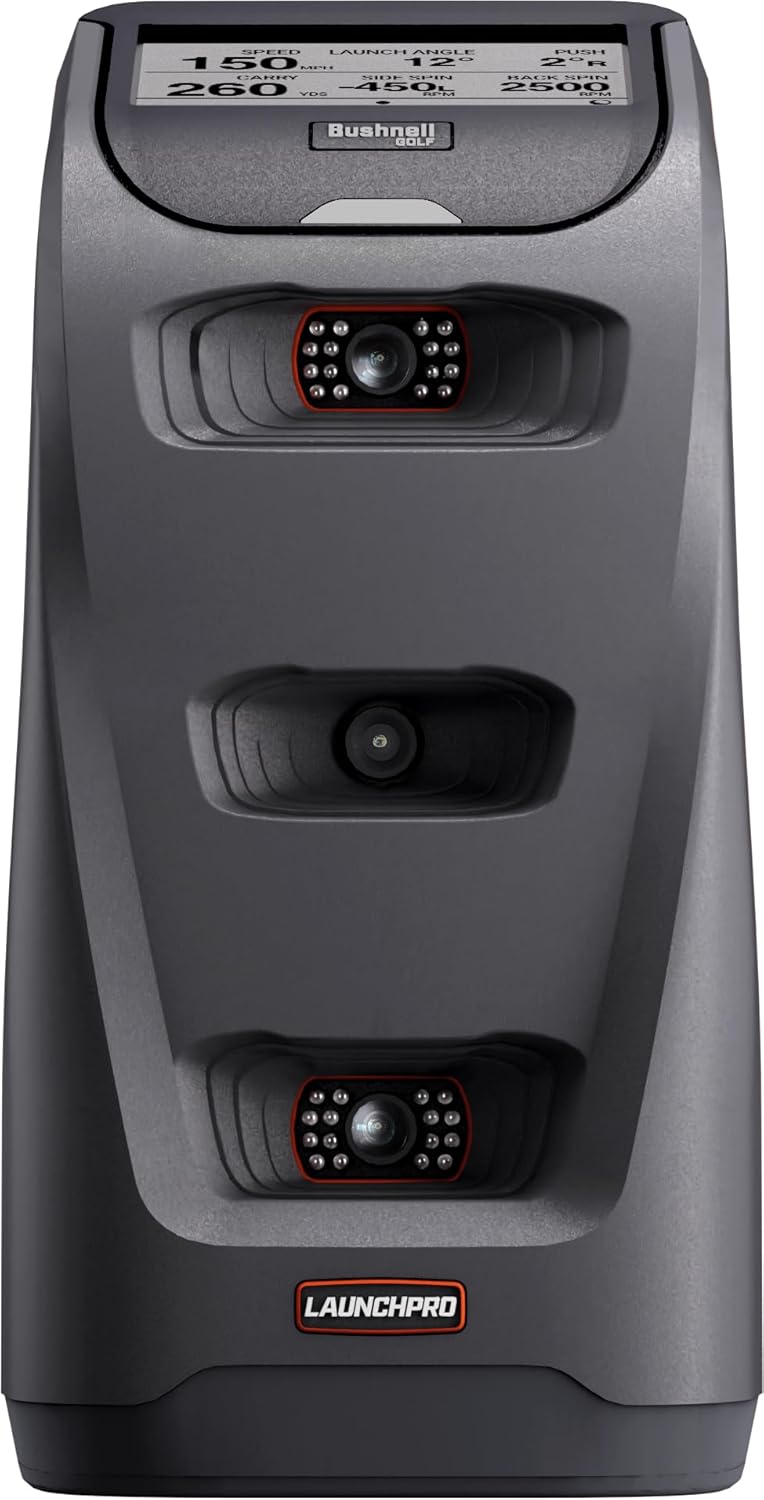
- Tracking Technology: Three camera photometric (Foresight GC3 platform)
- Measured Metrics: 8 core ball metrics on device; club data via markers
- Unit Placement: Beside the ball, no depth needed behind the tee
- Software Support: FSX Play, FSX Pro, GSPro on Gold tier
- Annual Subscription: Silver $199, Gold $499, GSPro adds $250

- Tracking Technology: Three camera photometric
- Measured Metrics: 10 ball metrics, 5 club metrics, no marker for ball data
- Unit Placement: Beside the ball, roughly 1 to 2 feet from stance
- Software Support: Home Tee Hero native, GSPro and E6 and TGC via PC
- Annual Subscription: Garmin Golf $99.99 per year

- Tracking Technology: Doppler radar only
- Measured Metrics: Ball and club speed measured; spin calculated without RCT balls
- Unit Placement: 6 to 8 feet behind the ball, plus 8 feet of flight
- Software Support: Home Tee Hero native, GSPro via community bridge
- Annual Subscription: Garmin Golf $99.99 per year
The Bushnell Launch Pro is the strongest pick here. It runs the same three camera hardware MyGolfSpy measured at 1.5 percent carry deviation and 2.0 percent spin deviation against a Foresight reference, in a room as shallow as 10 feet deep.
Two More Units Round out The Field on Opposite Ends of Room Depth
| SkyTrak ST MAX | Rapsodo MLM2PRO | |
|---|---|---|
| Tracking Technology | Photometric camera + dual Doppler radar, 21 data points | Radar and camera hybrid, RPT ball required for spin |
| Unit Placement | Beside the ball, roughly 10 ft total room depth | 6.5 to 8.5 ft behind the ball |
| Software Support | Native Course Play; no official GSPro for new buyers | GSPro, E6 Connect, Awesome Golf |
| Annual Subscription | Free to $599.99/yr membership ladder | $199.99/yr or $599.99 lifetime |
| Check Latest Price | LINK | LINK |
1. Bushnell Launch Pro Circle B Edition Review
The Launch Pro Circle B is the right call for a dedicated bay between 10 and 15 feet deep where you want photometric accuracy that matches a $6,999 Foresight GC3, without the GC3 price tag. It runs the identical three camera hardware at $2,499.99, and it’s the only unit here with a real tiered subscription choice.
- Tri scopic three camera photometric tracking
- Sits beside the ball, not behind
- Foresight GC3 hardware under a Bushnell badge
- Eight ball metrics on the built in screen
- Battery and AC power for range use
What We Love About the Bushnell Launch Pro Circle B
Three Cameras That See Impact Instead of Guessing At It
Measured spin means the cameras photograph the ball at impact instead of estimating it from ball speed and launch angle afterward. Radar has to wait for the ball to fly before it can back into a spin number, and short indoor bays rarely give it enough flight to do that cleanly.
That distinction holds up hardest on a soft 40 yard wedge, where a radar unit is working with almost no flight window. The Launch Pro reads the shot the moment the ball leaves the face, and the box ships 48 club marker stickers that unlock club head speed, face angle, and impact location on top of ball metrics that need no marking at all.
Ever notice how every radar spec sheet buries the word “estimated”?
The Shallow Room Advantage No Retailer Puts in the Headline
The Launch Pro sits level with the ball, consuming zero feet of depth behind the tee. That single fact is why Home Performance Lab lists it as workable in rooms as shallow as 10 feet, and the top accuracy per dollar pick for anyone with 12 to 15 feet to spare.
Walk a real 15 foot bay: two feet for stance and swing, 11 to 12 feet of open flight to the screen, and the Launch Pro tucked beside the ball using almost none of it. The R10 and MLM2PRO both need 18 to 21 feet just to read spin reliably, so a two car garage that can’t fit either radar unit fits this one with room to spare.
The Subscription Ladder Bushnell Buries in the Fine Print
Silver runs $199 a year and Gold runs $499, and only Gold opens third party software. That door still isn’t fully open: GSPro requires Gold plus its own separate license around $250 a year, so GSPro on a Launch Pro actually costs $749 annually once both fees stack.
Run that five years out and Gold plus GSPro climbs to roughly $6,244.99 [VERIFY current GSPro subscription price], nearly matching the hardware spend a second time over. Lose the 14 day Gold trial and you lose FSX Pro, the extra course library, and third party access all at once.
Same Hardware, Different Badge, Different Price
The Circle B runs the same three camera platform as the Foresight GC3, which lists at $6,999 on its own. Bushnell’s licensing changes the badge, the touchscreen software, and the subscription structure, not the sensor accuracy underneath.
That gap is worth paying to close when you specifically want Foresight’s own GC3S ecosystem. It isn’t worth paying when the software you actually want is FSX Play, FSX Pro, or a Gold connection to GSPro, because the Launch Pro delivers the identical camera read for well under half the price.
Who Should and Shouldn’t Buy the Launch Pro Circle B
The Buyer This Unit Was Built For
Rooms between 12 and 16 feet deep with 9 foot clear ceilings are exactly what this unit was built for. It suits golfers who want tour grade ball data without a five figure spend, and buyers who can accept a permanent annual software line item as the cost of that accuracy.
Skip It If Your Budget Stops at the Hardware
Skip the Launch Pro if $2,499.99 is your entire budget with nothing left for software, because the unit is functionally useless as a simulator without an active Silver or Gold subscription.
Subscription averse buyers should look at the ST MAX’s free driving range tier instead. PC averse buyers belong with the R50, reviewed next.
- Pros: Matches GC3 camera accuracy at half the price
- Pros: Reads in rooms as shallow as 10 feet
- Pros: No ball marking needed for ball data
- Pros: Silver tier unlocks full club data at $199 a year
- Cons: Third party access gated behind $499 Gold tier
- Cons: GSPro adds a separate license on top of Gold
- Cons: Club stickers void USGA conformance for competition
- Cons: Handedness switching means moving the unit
2. Garmin Approach R50 Review
The Approach R50 is the right call for anyone who wants a complete simulator with no gaming PC, no projector required, and no software decisions to make. A built in 10 inch touchscreen runs Home Tee Hero on device, making it the only unit here that plays a full virtual round out of the box.
- Three cameras measure spin rate and axis
- Ten inch touchscreen runs Home Tee Hero natively
- No gaming PC required for course play
- HDMI out to any projector or TV
What We Love About the Garmin Approach R50
The Only Unit Here That Deletes the Gaming PC
Skipping a gaming PC build entirely is the R50’s whole pitch, and it’s a real one. A capable sim PC for GSPro or FSX Play runs $1,000 to $1,800 on its own, so the R50’s built in processor and screen erase that line item before you’ve spent a dollar on software.
What you give up is choice: FSX Play, GSPro, and TGC still need a separate Windows machine even on an R50, so this advantage applies only to golfers happy running Home Tee Hero as their main experience.
Measured Spin at a Price Where Most Units Estimate
Three high speed cameras read spin rate and spin axis directly at impact, the same measured approach the Launch Pro uses. Carry and total distance are still calculated from those measured launch conditions afterward, which is normal even on the most accurate photometric units.
Compare that to the R10 in the same Garmin lineup: the R10 calculates spin from an algorithm instead of measuring it. For a golfer fixing a slice, that’s the difference between a spin axis number you can trust and one that’s a guess dressed up as data.
Ninety Nine Dollars a Year Is the Cheapest Course Play Here
Garmin Golf runs $9.99 a month or $99.99 a year, the cheapest annual software line in this entire roundup. Stack it against the Launch Pro’s Gold plus GSPro at roughly $749 a year, and the five year gap is stark: $499.95 total for the R50 against roughly $6,244.99 for a fully licensed Launch Pro.
Let the license lapse on either unit and the effect is the same: no new courses, no leaderboard, no virtual rounds until you renew.
It Packs Down Into a Case When the Room Is Not Yours
Battery power plus a carry case means an R50 build doesn’t have to claim a garage bay permanently. Setup to first shot runs well under a minute once the tripod and screen are positioned, with no PC to boot and no projector to warm up first.
Sitting beside the ball at roughly 1.5 feet of offset means this unit asks for almost no depth behind the tee, the same shallow room advantage the Launch Pro brings.
Who Should and Shouldn’t Buy the Garmin R50
The Buyer Who Gets Five Thousand Dollars of Value
Families and mixed skill households who want plug in course play get the most from a $4,999.99 R50. It suits buyers who will never maintain a gaming PC, in rooms with 9 foot ceilings and 12 or more feet of depth.
Skip It If You Already Own a Simulator PC
Skip the R50 if a gaming PC already sits in the room, because the built in computer is a premium you’d be paying for twice. Redirect that budget to the Launch Pro or the ST MAX, and note that club fitters chasing dynamic loft need a different tier of unit entirely.
- Pros: No PC, projector, or tablet required to play
- Pros: Fits a 10 by 10 by 9 foot room
- Pros: Officially connects to GSPro, E6, and Awesome Golf
- Pros: Cheapest annual software line in this roundup
- Cons: Costs twice the Launch Pro for similar deviation
- Cons: Spin axis still requires club tracking stickers
- Cons: Side placement means repositioning for lefties
3. SkyTrak ST MAX Review
The SkyTrak ST MAX is the right call for a Mac or iPad household building a 10 to 15 foot bay who wants polished native course play, with the honest caveat that officially sanctioned third party software is no longer offered to new buyers. It fuses photometric cameras with dual Doppler radar for 21 total data points.
- Photometric camera reads the ball
- Dual Doppler radar reads the club
- Twenty one data points, no stickers required
- Native Mac support, rare in this category
- Works in roughly ten feet of depth

What We Love About the SkyTrak ST MAX
Two Sensors Doing Two Jobs in One Housing
The ST MAX splits the work: cameras capture ball data at impact while dual Doppler radar reads club delivery, and neither side needs a sticker on your club face. That fused design matters most below 80 mph swing speed, where radar-only camera and launch monitor systems can struggle to lock a clean read.
The real gap here is angle of attack, which Breaking Eighty’s hands on testing confirms the ST MAX doesn’t measure at all. At a $2,995 list price against a $699.99 unit that does measure it, that’s a genuine miss worth knowing before you order.
The Shallowest Room Tolerance in This Review
Roughly 10 feet of total depth is what the ST MAX gets credited with, tying the Launch Pro for the shallowest tolerance in this review. A 12 foot spare bedroom clears that with margin for stance and screen buffer both.
Compare that against the 14.5 foot floor sourcing puts under the MLM2PRO and R10, and the premium price starts to make sense for a room that simply can’t go deeper. [VERIFY]: one guide lists a 10 foot minimum depth for this class, while another states 8 to 12 feet behind the ball; print both and build for the larger number.
Free Tier Data Without a Single Subscription Dollar
A free Basic plan still returns full ball and club data on the driving range, no subscription required. Paid tiers stack from there, and two conflicting price sets exist: one lists Essential at $129.99 a year up to Elite at $599.99, while a 2026 repricing set puts the same tiers as low as $99.99 up to $499.99. [VERIFY] which set is live before publishing a five year total.
Five years free costs nothing but locks out course play; five years at Elite runs $2,499.95 to $2,999.95 depending on which price set holds, on top of hardware with no built in screen.
The Warranty Owners Burn Through Before Their First Winter
Six months or 25,000 shots, whichever comes first, is the coverage window stated for this class of unit [VERIFY against SkyTrak’s current warranty page]. A golfer hitting 150 balls three nights a week burns through 25,000 shots in under a year, so heavy winter practice can outrun the warranty before spring.
Forum reports flag laser and wifi module failures after that window closes, and the 30 day return period carries a restocking fee, so test heavily in month one rather than easing in.
Who Should and Shouldn’t Buy the ST MAX
Built for the Room That Rules Out Radar
Basements and spare rooms between 10 and 15 feet of total depth are exactly what rules radar out and the ST MAX in. It’s right for Mac households with no interest in building a Windows machine, and for golfers who practice more than they play virtual rounds.
Skip It If You Have Eighteen Feet and No Ceiling Problem
Skip the ST MAX if the room already clears 18 feet with no ceiling issue, since that depth unlocks cheaper radar units with wider data sets. Point yourself toward the R10 instead, and flag the ST MAX’s $2,995 versus $1,995 price conflict for verification before ordering.
- Pros: Only major camera and launch monitor system with native Mac support
- Pros: No ball marking required for any spin data
- Pros: 21 native data points, no paywall on core metrics
- Pros: Free tier still returns full range data
- Cons: Doesn’t measure angle of attack at all
- Cons: No official GSPro or E6 Connect for new buyers
- Cons: Six month or 25,000 shot warranty window
4. Rapsodo MLM2PRO Review
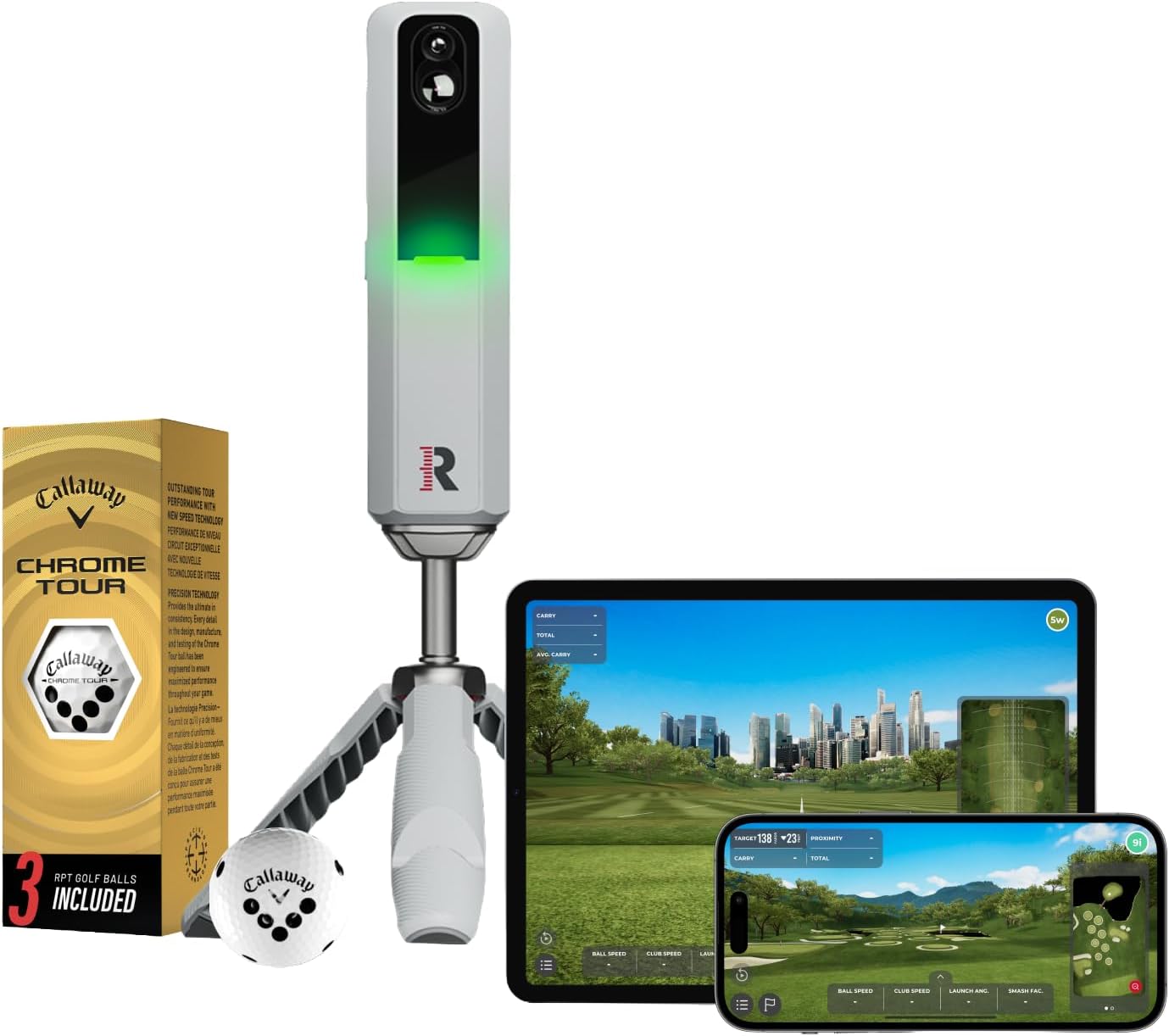
The Rapsodo MLM2PRO is the right call for a golfer with 18 to 21 feet of usable depth, or an outdoor primary player who wants credible indoor numbers on a real budget. It posted some of the tightest indoor deviation in this roundup at $699.99, matching units costing four to seven times more.
- Radar and camera hybrid in one unit
- Impact video at 240 frames per second
- Measured spin on Titleist RPT balls
- Seven hundred dollars with a lifetime membership option
What We Love About the Rapsodo MLM2PRO
Video You Can Actually Watch Your Swing On
Impact Vision records dual swing replay at 240 frames per second, and nothing else under $1,000 in this roundup offers that. Picture reviewing a chunked wedge on your phone between shots instead of just seeing a number and guessing what went wrong.
That saved video sits behind the Premium membership, so the camera feed alone doesn’t do much without an active subscription running behind it.
Measured Spin, But Only If You Buy the Balls
Spin measures within roughly one percent of a Foresight reference, but only on Rapsodo’s proprietary RPT balls, made by Callaway and Titleist with a printed dot pattern the camera tracks. Hit a scuffed range ball instead and spin rate and spin axis disappear from the readout entirely.
A dozen RPT balls runs about $30 [VERIFY current pricing], and one long term owner reports a single sleeve surviving several thousand indoor shots. Budget that cost right next to the $199.99 annual membership, since both are recurring costs the sticker price hides.
The Lifetime Membership Math Most Reviews Skip
Premium runs $199.99 a year or $599.99 once, and the crossover where lifetime wins lands in year three. Pay annually past that point and you’re handing Rapsodo more money for access a one time fee already covers.
Five year math: annual billing totals $999.95, lifetime caps at $599.95, a $400 gap for owning the unit past two seasons. Compare that to a Garmin R50 running Home Tee Hero at $499.95 over the same five years, and the R50’s built in screen starts to look like the better bundle for anyone without 18 feet of room.
Who Should and Shouldn’t Buy the MLM2PRO
The Golfer Who Practices More Than He Plays
Range regulars who want one unit both indoors and at the range get the most out of an MLM2PRO. It suits budget builds under $1,000 where swing video matters as much as course play, provided the room clears the depth spec below.
Skip It If Your Room Depth Is Genuinely Unclear
Skip this unit if your room depth is genuinely unclear, because sourcing on this exact spec ranges from 8 feet total to 15.5 feet recommended. Shallow room buyers belong with the ST MAX or Launch Pro instead, since the radar half of this hybrid degrades first the moment the flight window closes.
- Pros: Tightest launch angle and carry deviation in testing
- Pros: Measures angle of attack and club path directly
- Pros: Zero bay floor footprint, works both handedness
- Pros: Officially supports GSPro, E6, and Awesome Golf
- Cons: Needs 18 to 21.5 feet of total room depth
- Cons: Captures zero putts
- Cons: Spin needs proprietary RPT balls to register
5. Garmin Approach R10 Review
The Approach R10 is the right call for an outdoor primary golfer, or a buyer with 18 to 21 feet of depth, who wants a working simulator for under $700 all in. It’s explicitly the wrong choice as a primary indoor launch monitor in any bay under 16 feet deep.
- Doppler radar under six hundred dollars
- Ten hours of battery per charge
- Home Tee Hero at $99.99 yearly
- Indoor and outdoor with equal ease
What We Love About the Garmin Approach R10
The Cheapest Honest Entry Into Simulator Golf
$599.99 list price [VERIFY: one retailer lists $499.99] makes this the cheapest credible route into simulator golf here. Price a full build with a net, a mat, and a year of Garmin Golf, and the total lands around $1,100 to $1,300, still less than a single winter of hourly bay rentals.
That’s what $599.99 actually buys: a working radar unit and nothing else, with every other piece sold separately.
Radar That Rewards a Long Room and Punishes a Short One
This unit needs 6 to 8 feet behind the ball plus 8 feet of flight in front of it, which several sources round to a 14 to 15 foot minimum total depth. Fall short and carry numbers drift 10 to 15 yards off, which is exactly why this unit doesn’t appear in independent indoor testing data at all.
A garage that clears 18 feet handles the R10 cleanly. A 13 foot basement starves it before the first swing.
The RCT Ball Requirement Nobody Mentions Before Checkout
Spin is calculated by algorithm, not measured, unless you’re swinging Titleist RCT balls, and Garmin ships zero of them in the box. Reviewers stop trusting spin numbers the moment RCT balls aren’t in play, because the radar has only an estimate to fall back on.
Price a season of RCT balls against the unit’s own $599.99 sticker and the “budget” pick starts adding real line items fast.
Who Should and Shouldn’t Buy the R10
Perfect for the Deep Garage and the Driving Range
Two car garages and outbuildings with 15 or more feet of depth are the right home for an R10. It suits golfers splitting time between home practice and the range, and first timers testing whether they’ll use a simulator before spending more.
Skip It If Your Room Is Under Fourteen Feet Deep
Skip the R10 if your room sits under 14 feet deep, because a starved radar unit produces numbers you can’t trust for club gapping or swing changes. Send that reader to the ST MAX or Launch Pro instead, since no firmware update fixes a room that’s simply too short.
- Pros: Cheapest working simulator path in this roundup
- Pros: Genuine zero-subscription path using free courses
- Pros: Zero bay floor footprint, no repositioning needed
- Pros: 2026 update brought R50-level graphics for free
- Cons: Measures only 4 of its 14 total metrics
- Cons: Not recommended for primary indoor use
- Cons: Needs 18 to 20 feet of total room depth
Which of the Best Indoor Golf Simulators Survives a 15 Foot Room
Three of these five units work in a 15 foot room: the Launch Pro, the R50, and the ST MAX. The MLM2PRO and R10 do not, because both sit behind the golfer and need real ball flight in front of the sensor to read spin.
Here’s the math for a 15 foot bay: subtract roughly a foot for screen buffer and two feet for stance depth. A camera unit beside the ball uses almost none of what’s left; a radar unit needs 6 to 8 feet of setback plus 8 feet of flight before it sees the screen, which is 14 to 16 feet on its own. Measure at the actual hitting position, not the longest wall, because a support post or bump-out reads shorter than the tape measure says.
Read our detailed home golf simulator reviews for the full-room builds these five units actually landed in before you commit to one for yours.
The Buyer’s Guide: Cutting Through the Hype
The Three Specs That Decide Realism Indoors
Measured data, room depth, and placement decide whether a simulator actually works, not the metric count on the box. Measured data means a spec is read directly at impact rather than estimated afterward, and photometric tracking means a camera physically photographs the ball at the moment of contact to get that read.
Radar stops being a fair choice once total depth drops under 15 to 16 feet. Renters and anyone who can’t commit to a permanent build should look at portable golf simulator options for renters instead of any unit here that demands a fixed enclosure. Of the five units tested, the Launch Pro, R50, and ST MAX all clear a 15 foot room; the MLM2PRO and R10 do not.
The Price Tier Truth From Six Hundred to Five Thousand
Under $1,000 buys radar tracking, calculated spin, and a real depth requirement, full stop. $2,000 to $3,000 buys camera systems with measured spin and a permanent annual subscription attached, while roughly $5,000 buys cameras plus the built in computer you’d otherwise have to build yourself.
Price every tier across five years, not at checkout, because the R10’s $599.99 sticker and the Launch Pro’s $2,499.99 sticker land far closer together once software is added on both sides.
The Basement Beam Nobody Measured Until the Screen Arrived
Ceilings measured at the tallest point instead of the actual hitting position cause most of the surprises in this category. Enclosures ordered without subtracting side netting clearance run narrower than the box implies, and a hitting mat left proud of the floor sends impact straight into your wrists.
Add subscription renewals landing months after the build was budgeted, and that covers the basement beam moments build logs report most often. Measure at the hitting position tonight, not the doorway.
Ghost Shots and Connectors That Break on Update Day
GSPro compatibility on both the R10 and R50 runs through community API bridges, not an official vendor integration. SkyTrak reaches GSPro only through a Discord distributed community tool, never an official connection, and no current SkyTrak model appears on GSPro’s own supported monitor list.
Firmware updates can quietly break these bridges with zero vendor recourse, so a working GSPro connection today is never a guarantee it still works after the next update.
How We Tested and Sourced Every Number Here
Manufacturer specification pages were pulled over retailer aggregation every time a conflict came up. Owner failure patterns came from simulator forum and community threads, and every conflicting number in this review got printed side by side rather than quietly resolved in one direction.
Every price here is dated, because this category reprices without warning.
Ownership and Maintenance Guides
What Software Subscriptions Actually Cost You Over Five Years
Bushnell’s Gold tier plus a GSPro license stacks to roughly $749 a year, the steepest recurring cost in this roundup. Garmin’s Home Tee Hero holds flat at $99.99 across both R models, while SkyTrak spans free to $599.99 a year depending on which course library you want.
Let any of these licenses lapse and the course library disappears with it, even though the hardware you already paid for keeps sitting in the bay.
Gaming PC Upkeep and the Updates That Break Connections
GSPro wants an RTX class GPU for a clean 1080p picture and more for 4K, and driver updates plus GPU swaps routinely trigger license reverification. That’s a seasonal ritual for anyone running FSX Play, GSPro, or E6 Connect: getting the bay talking to the PC again after every update.
The R50 and R10 both skip this section entirely, since Home Tee Hero runs without a Windows machine on either one.
Marked Balls, RCT Balls, and What Scuffs Do to Your Data
RCT balls are mandatory for trustworthy spin on the R10, and RPT balls do the same job for the MLM2PRO; neither Garmin nor Rapsodo ships enough to last a season. Bushnell’s club marker stickers wear off with use, though the box includes 48 to start.
A dirty or scuffed ball throws off a camera read the same way a worn sticker throws off a club data read, so build an annual ball and marker budget before the first winter of daily practice, not after.
Screen Tension, Mat Wear, and the Joints That Pay for Both
A loose impact screen changes both ball rebound and the sound of every strike, and it’s worth re-tensioning the moment either one shifts. Thin foam laid over concrete sends every impact straight into your wrists and elbows instead of absorbing it.
Plan on replacing a screen and mat on a realistic multi year interval, not whenever they visibly fail, and keep real clearance around frames and any hard surface nearby.
Conclusion
The tape measure that opened this review answers the question now: room depth, not metric count, decides which of the best indoor golf simulators actually works in your space. Camera units like the Launch Pro, R50, and ST MAX fit rooms as shallow as 10 to 15 feet, while radar units like the MLM2PRO and R10 need 18 feet or more.
Measure your ceiling height at its lowest point tonight, then take ten full driver swings in the space before you order anything. Whatever you choose here still beats another season of range fees and a hitting net that never quite matched the numbers you needed.
Frequently Asked Questions
How much room depth do I actually need for an indoor golf simulator?
It depends on the sensor type, not the brand. Camera units like the Launch Pro, R50, and ST MAX work in 10 to 15 feet of total depth, while radar units like the R10 and MLM2PRO need 18 to 21 feet to read spin reliably.
Are camera or radar launch monitors more accurate indoors?
Camera based units measure spin directly at impact, which makes them more consistent in short indoor bays. Radar units estimate spin from ball flight, and that estimate gets shakier the less flight distance a room can give them.
What is the difference between measured and calculated spin rate?
Measured spin comes from a sensor reading the ball’s rotation directly at contact, usually with a camera. Calculated spin is a software estimate built from ball speed and launch angle, standing in for a read the sensor never captured.
Do I need special marked balls to get spin data indoors?
Only on certain units. The R10 needs Titleist RCT balls and the MLM2PRO needs Rapsodo’s RPT balls for spin to show up at all, while the Launch Pro and ST MAX read spin optically off any ball.
Which of these launch monitors officially support GSPro?
The Bushnell Launch Pro, Garmin R50, and Rapsodo MLM2PRO all officially support GSPro through their own vendor connections. The Garmin R10 relies on a community bridge, and no current SkyTrak model appears on GSPro’s own supported monitor list.