Indoor golf simulator cost never means what the price tag says. You measured the garage, found a launch monitor in your range, and felt good about the number, right up until the drywall bid and the software renewal email arrived in the same month. Retailers quote hardware and go quiet on room prep, annual licenses, and the ball you need for real spin data indoors.
By the end you will know your real five year number, which of the simulators we rate highest fits the room you measured, and which fees you can skip.
Indoor Golf Simulator Cost
Indoor golf simulator cost covers four separate bills: the launch monitor, the room work that makes it usable, the screen and enclosure that contain the shot, and the software subscription that keeps club data flowing. Most home builds land between $5,000 and $20,000 once every bill is counted. The hardware is the down payment. The room and the renewals decide the rest.Why the sticker price is never the final price
The sticker price on a launch monitor box is never the final price, because it prices one bucket out of four and stays silent on the other three. A buyer who prices the Bushnell Launch Pro at $2,499 and stops there has priced the down payment, not the purchase.
The $5,000 plan that turns into $8,000
A $5,000 plan for an indoor golf simulator commonly lands between $7,000 and $8,500 once the room and the first year of software land on top. Forum consensus across owner build threads puts real spend at 30 to 50 percent above the original plan, and the gap comes from three places every planner forgets: the electrician, the screen buffer, and the license that gates club data on day one.
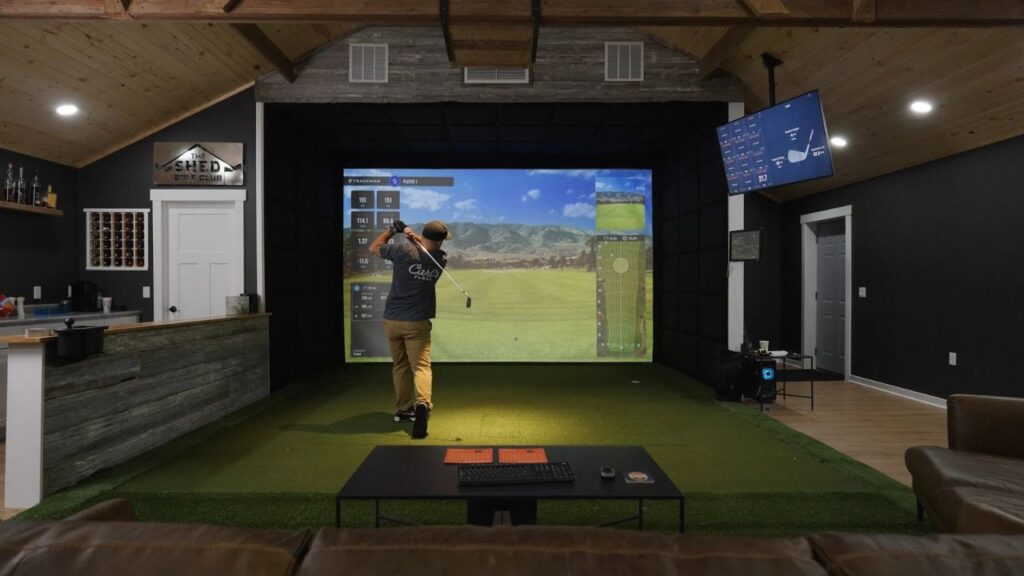
Name that gap now so it does not ambush you in month two. A 9 foot basement with an exposed joist ceiling and an undersized breaker panel can add $1,500 to $3,000 before a single ball gets hit.
Ready to see where that money actually goes?
So what is the real indoor golf simulator cost?
The real indoor golf simulator cost runs from about $2,000 for a bare bones setup to $70,000 for a premium home or commercial build, with most home installs settling between $5,000 and $20,000.
| Tier | Total Cost | What It Buys |
|---|---|---|
| Budget | $2,000 to $4,000 | Radar launch monitor, net or basic screen, minimal software |
| Mid | $5,000 to $12,000 | Camera or radar unit, real enclosure, 4K projector, full software license |
| Premium | $15,000 to $30,000 | Overhead or flagship camera unit, prebuilt bay, laser projector, finished room |
| Commercial | $30,000 to $70,000+ | Multi-bay install, redundant hardware, league-grade uptime and support |
The $5,000 to $20,000 mid tier gets used every week, because it is the first tier where the room, the screen, and the software all clear the bar at once.
Why retailers quote hardware and skip everything else
Retailers quote hardware and skip everything else because the bundle price is the number that closes the sale, and drywall, circuits, and renewals close nothing.
A package page listing a launch monitor, a screen, and a mat for $6,999 reads like a full setup. Here’s the thing: it’s a parts list.
It leaves off the dedicated 20 amp circuit your projector and PC need, the ceiling finishing over an exposed joist, and the $250 GSPro license that arrives the day you want to play a course instead of hitting range balls into a bare screen.
Some buyers close that first year gap by leasing instead of paying upfront rather than stacking the room work and the software renewal on one credit card statement.
The seven line items in every simulator build
Every simulator build breaks into seven line items: launch monitor, screen, enclosure, mat, projector, PC, and software, and skipping the honest number on any one of them is how a $5,000 plan becomes an $8,000 bill.
Hardware, room, and recurring costs are three buckets
Think of a simulator build the way you would think of a car. Hardware is the sticker price. Room prep is the destination fee and the tax you did not put in your mental number. Software is the payment that keeps arriving long after the purchase feels finished.
Split every dollar into those three buckets before you buy anything:
- Hardware: launch monitor, screen, enclosure, mat, projector, PC.
- Room prep: circuit, ceiling work, lighting control, flooring.
- Recurring: software license, ball replacement, screen replacement.
Lump all three together and the budget breaks quietly, one forgotten circuit or one gated license at a time. Sketch these three buckets on paper tonight before you open a single product page.
The PC nobody mentions until checkout
Most simulator software needs a dedicated gaming PC, and the laptop sitting in your closet almost certainly will not run it. GSPro publishes a minimum GPU requirement of a GTX 1070 or an RX 580, which rules out integrated graphics and most laptops built for spreadsheets rather than rendering a golf course in real time.
Price a simulator PC as its own honest line item, not an afterthought. A build that clears GSPro’s minimum comfortably runs $700 to $1,200, and skipping this line is a common reason a finished bay still cannot run the software the owner paid for.
Balls, tees, and the consumables that repeat forever
Consumables are the cost nobody budgets past year one, and they repeat every season a simulator gets used. Radar units often need marked or reflective balls to capture spin indoors, running $65 to $70 per dozen, well above a standard sleeve.
Titleist’s Pro V1 RCT ball is validated for Trackman 4, the Garmin Approach R10, the Mevo Plus, and the Full Swing KIT, which makes it the safe default when a radar unit’s spec sheet calls for a marked ball.
An indoor ball also wears differently than one played outdoors: repeated screen impact scuffs the cover in a pattern you will not see on the course, and a scuffed cover changes the spin numbers the radar reads before you notice the ball needs replacing.
Your launch monitor sets the whole budget
The launch monitor you pick sets the whole budget, because its tracking technology decides the room depth you need, and room depth decides which enclosure, screen, and projector combination is even possible.
Photometric or radar decides your room, then your wallet
Photometric launch monitors use cameras positioned beside the ball to read impact directly, which lets them work in a room as shallow as 10 to 15 feet. Doppler radar units track the ball’s flight after contact and need 6 to 9 feet of clearance behind the golfer to do it, pushing radar builds to 16 to 21 feet of total room depth.
A 12 foot basement rules out most radar setups before you have compared a single spec. Measure your total depth first. It decides your tracking technology before price ever enters the conversation.
What each price tier actually buys you
Every price tier buys a specific jump in what gets measured versus estimated, not just a nicer box.
| Launch Monitor | Street Price (2026) | What You Get |
|---|---|---|
| Garmin Approach R10 | ~$499 | Radar, calculated club data, honest entry point |
| SkyTrak+ / ST MAX | ~$1,995 to $2,995 | Photometric read on ball data, tiered software |
| Bushnell Launch Pro | ~$2,499 | Foresight’s camera engine, Bushnell Golf brand |
| Foresight Sports GC3 | ~$6,999 fully unlocked | Measured club data, premium accuracy |
| Trackman iO / GCQuad | $14,000+ | Dual radar and camera fusion, commercial grade |
Bushnell Launch Pro runs Foresight Sports’s photometric camera engine under the Bushnell Golf brand. Foresight, acquired by Vista Outdoor in 2021, now sits inside the Revelyst Precision Sports Technology platform alongside Bushnell Golf, which is why the two brands share camera technology at different price points.
Chasing the flagship tier without a matching room wastes money twice, once on hardware the space cannot showcase and once on the Trackman bay pricing explained commitment behind it.
The accuracy gap you are paying to close
Every step up in launch monitor price is, in part, a purchase of closing an accuracy gap that matters more to some golfers than others. Independent testing against a GCQuad reference unit found the SkyTrak+ reading driver carry 7 to 9 percent short, a gap of roughly 19 yards on a 225 yard drive.
That gap matters for a data serious player dialing in exact carry numbers for course strategy. It matters far less for a family buyer whose kid just wants to see a ball fly on screen. Name your own use case honestly before paying for accuracy you will not use.
The room costs nobody puts in the quote
Room costs never appear on a hardware quote, and they routinely add $2,000 to $5,000 before the first ball gets hit.
How much ceiling height do I need?
Nine feet is the functional floor for a full driver swing, and ten feet is the real standard most builders recommend. Measure the lowest obstruction in the room, not the drywall: an HVAC duct, a ceiling joist, or a garage door track running through the swing plane counts, not the ceiling height printed on your home’s listing.
Finishing an exposed joist ceiling to gain that clearance runs $1,000 to $3,000 depending on duct rerouting. A garage builder who skips this measurement and finds a duct two feet left of the tee line after the enclosure is up gets to pay for the fix twice.
The dedicated circuit your breaker panel is begging for
A simulator bay needs its own dedicated circuit, because a projector, gaming PC, and monitor running together can pull 10 to 15 amps continuously. Experienced owners recommend a dedicated 20 amp circuit for the bay rather than sharing an outlet with a chest freezer or a shop light.
Budget $200 to $800 installed for that circuit, considerably more if the panel itself needs an upgrade to add capacity. Skip it and you will learn about it mid swing, when a tripped breaker kills the projector on your backswing.
Paint, flooring, and the fixes you find later
Paint and flooring fixes show up after the equipment ships, not before. Some camera based units want specific background contrast behind the hitting area to read the ball cleanly, which means a wall color choice you did not expect to make. Turf, trim, and blackout curtains for daytime glare stack up faster than most first time builders plan for, often adding another $500 to $1,500 to a garage conversion.
Screen, mat, and the money that buys safety
Screen and mat spending is not optional polish. It is the line item that keeps a 150 mile per hour mishit from bouncing back at the golfer who just hit it.
Why the screen cannot hang flat against drywall
An impact screen cannot hang flat against a wall, because it needs 12 to 16 inches of buffer space behind it to flex and absorb the shot before energy transfers back into the room.
Ball speed off the clubface can exceed 150 mph indoors, and a screen with zero clearance behind it sends that energy straight back toward the golfer instead of dissipating it into the fabric’s give.
This is not a spec to round down to save enclosure depth. Confirm the buffer with your enclosure kit’s manufacturer before you frame anything.
Cheap mat versus real mat, per the forums
A cheap mat costs less on day one and costs more in soreness by week three. Forum owners across build threads consistently report wrist, elbow, and neck soreness on thin mats that do not absorb impact, the same joint stress a golfer would eventually feel hitting off pavement.
Studio grade mats run roughly $500 to $2,000 depending on size and hitting zone width. Fiberbuilt publishes a 300,000 shot durability guarantee on its mats, a number worth checking against any mat you are considering, since a mat that compresses and hardens after a single winter of daily use is a hidden replacement cost nobody quotes upfront.
Enclosure kits versus DIY frames: real 2026 numbers
An enclosure is the safety layer that contains a mishit, not an accessory to skip. Carl’s Place DIY kits run roughly $800 to $1,500 for frame and screen material, while prebuilt bays like the SIG10 and SIG12 sit near $3,599 to $3,999 fully assembled.
| Option | Price (2026) | Trade-off |
|---|---|---|
| Carl’s Place DIY kit | $800 to $1,500 | Cheapest, needs a weekend of assembly |
| Prebuilt SIG10 / SIG12 bay | $3,599 to $3,999 | Full containment, faster setup |
| Custom install | $5,000+ | Built to exact room dimensions |
Side and overhead containment matter as much as the front screen. A mishit that clears the screen’s edge without side netting finds a wall or a person standing off to the side.
Projector math, and the shadow you forgot
Projector math decides whether your setup looks like a golf course or a shadow puppet show, and the two specs that decide it are throw ratio and lumens.
Throw ratio explained without the spec sheet
Throw ratio is the distance from the lens to the screen divided by the width of the projected image, and it tells you where the projector has to sit relative to the golfer’s swing path. Short throw units run between 0.4:1 and 1.0:1, mounting 3 to 8 feet from the screen, while standard throw units sit above 1.0:1 and need enough distance that they usually end up mounted directly over the hitting area.
Mount a standard throw projector over the tee line and you paint your own shadow across the screen every time you address the ball, which is exactly the kind of setup failure that stalls a build for weeks while the owner tracks down the right lens spec.
How many lumens your garage actually needs
ANSI lumens measure a projector’s brightness under a standardized industry test, and the number you need depends entirely on how much ambient light the room lets in.
Dark, finished basements work fine around 3,000 ANSI lumens, while garages with daylight leaking around the door or overhead lights left on need 4,000 or more to keep fairway texture and green contours readable.
Verified 2026 projector options span roughly $799 to $3,799 depending on brightness and resolution, and buying below your room’s ambient light level is a fast way to end up with a washed out, unusable image.
The mounting spot that gets projectors killed
A projector mounted too close to the hitting zone eventually takes a direct hit from a rebound, and it is a matter of when, not if. Budget for the mount, the cable run, and a physical shield alongside the projector itself, not just the unit’s sticker price. A ceiling mount placed inside the rebound zone is a repair bill waiting for the next mishit driver.
Subscriptions that quietly outlive your hardware
Subscriptions quietly outlive the hardware they are attached to, because a launch monitor purchase is often just the entry fee for a software bill that renews every year you own it.
How much does simulator software cost per year?
Simulator software runs $99.99 to $499.99 per year depending on platform and tier, and several platforms stack rather than replace one another. GSPro is a $250 per year license with no perpetual option left. SkyTrak’s tiers run Essential at $99.99, Core at $249.99 to $299.99 depending on whether you pair with Foresight or TrackMan data, and Elite at $499.99 annually.
Bushnell gates club data behind its own FSX subscription tiers, FSX Silver at $199 per year and FSX Gold at $499, and GSPro’s $250 license requires an active Gold subscription underneath it. Stack those two together and a Launch Pro owner who wants GSPro courses faces a $749 first year software bill on top of the $2,499 hardware, a number that never appears on the box.
The lifetime license debate, straight from GolfWRX
GolfWRX owner threads run long on this exact frustration: GSPro retired its lifetime license add on and now sells yearly access only, and owners who play mostly local rounds resent the renewal most, because they are paying an annual fee for a feature set that has not changed since the year they bought in.
Five years of software before you swing once
Five years of GSPro access alone totals $1,250 before a single optional course pack, and premium GSPro course packs run another $50 to $200 each, entirely optional but easy to accumulate one purchase at a time. Trackman and Full Swing software sit meaningfully higher and lock to their own hardware, which removes the option to shop a cheaper platform later without replacing the launch monitor too.
Four honest builds at four honest budgets
Four honest budgets cover almost every buyer serious enough to be reading this deep into a cost breakdown, and each one gives up something specific in exchange for its price.
The $2,500 build and what it gives up
A $2,500 build typically pairs a Garmin Approach R10, a basic net and mat, a budget 1080p projector, and minimal or no paid software. It gives up spin fidelity on anything but a driver, real room depth for a radar unit, and any meaningful containment beyond a net that stops a ball rather than absorbing it safely.
It is a fine starting point for a family buyer who wants to hit balls in the garage this winter. It is not a build a data serious player will be satisfied with past the first month, and cheaper starting points sit inside these lower-cost simulator options if $2,500 is still above budget.
The $8,000 build most people should copy
The $8,000 build is the one most buyers should actually copy, because it is the first tier where every component clears the bar at once. A camera based unit near $2,000, a Carl’s Place DIY enclosure, a 4K short throw projector, and a GSPro license land inside a finished basement or garage with a dedicated circuit and a mat that actually protects your elbows.
This tier gets used far more often than premium builds sitting unused in a corner, because nothing about it is a compromise a weekly golfer notices.
The $20,000 build and where money stops helping
Past $20,000, money stops buying better golf and starts buying atmosphere. An overhead or flagship camera unit, a prebuilt bay, a laser projector, and a fully finished room look and feel premium, but the ball flight data a mid handicapper sees rarely improves enough to justify the jump from the $8,000 tier.
Say the quiet part out loud: a nicer room changes how a build feels to stand in. It rarely changes what the swing actually did.
The unfinished garage that never becomes a simulator
The most expensive simulator in any neighborhood is the one sitting cold in an unfinished garage, because room readiness predicts weekly use far better than hardware tier does. The builds that actually get played every week are not the priciest ones. They are the finished ones, with the circuit run, the ceiling cleared, and the mat installed before the launch monitor ever showed up.
The five year number and the upgrade trap
The five year number on an indoor golf simulator is almost always higher than the day one purchase price, because recurring fees and at least one hardware upgrade reshape the total across five real seasons of use.
Why day one is only part of the bill
Hardware is the down payment on a simulator, not the purchase itself. Software renewals, consumable balls, an eventual screen replacement, and one likely upgrade cycle all add to the total across five years, which is why a single headline price from a retailer’s homepage tells you almost nothing about what you will actually spend.
The R10 to SkyTrak upgrade everyone makes twice
Owners who start on a Garmin Approach R10 commonly hit its indoor spin measurement limits within a season and upgrade to a camera based unit soon after. That upgrade comes with a real resale loss: used R10 units typically resell for $250 to $350, a fraction of the $499 purchase price, and what you can recover on resale rarely covers the gap to the next tier up.
Buying the right unit for your room once beats buying twice for a shrinking budget. Measure your room’s real depth before your first purchase, and this upgrade cycle becomes optional instead of inevitable.
Total cost of ownership in plain English
Total cost of ownership means adding hardware, room prep, software, and eventual replacements into one number instead of judging a build by its sticker price alone.
| Build Tier | Hardware | Room Prep | 5-Year Software | Likely Replacements | 5-Year Total |
|---|---|---|---|---|---|
| Entry ($2,500 build) | $2,500 | $500 | $0 to $500 | Mat, net | ~$4,000 to $5,000 |
| Mid ($8,000 build) | $8,000 | $2,000 | $1,250 to $2,500 | Ball supply, screen | ~$12,000 to $14,000 |
| Premium ($20,000 build) | $20,000 | $4,000 | $2,500+ | Projector bulb, mat | ~$27,000 to $30,000 |
Pick your tier with these full numbers in front of you, not the number printed on a single hardware box.
Conclusion
You arrived thinking a launch monitor’s price tag was the price. It never was. The room you own and the software you rent decide what actually lands on your card every year.
Tonight, take a tape measure into the space and write down the ceiling height at its lowest obstruction and the full usable depth. Price only the launch monitors that fit those two numbers.
A range membership renews every year anyway. A room measured correctly the first time keeps paying you back in February swings for a decade, long after the sticker price stopped mattering.
Frequently Asked Questions
How much does an indoor golf simulator cost for a complete setup?
Most complete home setups run $5,000 to $20,000. Entry level builds start around $2,000, and premium or commercial installs can reach $70,000, but the tier that gets used every week almost always sits in that $5,000 to $20,000 middle band.
How much do golf simulator software subscriptions cost per year, and which ones stack?
Software runs $99.99 to $499.99 per year, and some platforms stack on top of each other. Bushnell’s Gold tier at $499 per year has to stay active before its own GSPro license even connects, pushing a first year software bill to $749 on a single launch monitor.
How much does it cost to prep a garage or basement before the equipment arrives?
Room prep commonly adds $2,000 to $5,000 before any hardware ships. Expect $1,000 to $3,000 for ceiling finishing, $200 to $800 for a dedicated circuit, and several hundred more for paint, flooring, and light control depending on the room.
Do golf simulator licenses transfer when you sell the unit?
No, most licenses do not transfer freely. Foresight Sports’ own device transfer policy confirms its software licenses are non-transferable and a device transfer fee applies, which quietly erases resale value that buyers assume they will recover later.
What does an indoor golf simulator actually cost over five years?
Expect $4,000 to $5,000 for an entry build, $12,000 to $14,000 for a solid mid tier build, and $27,000 to $30,000 for a premium build across five years. Software renewals, consumables, and one likely upgrade cycle add well beyond the day one hardware price.
3 thoughts on “Indoor Golf Simulator Cost: The Subscription Mistake”